

Accounting software for Malaysian small businesses
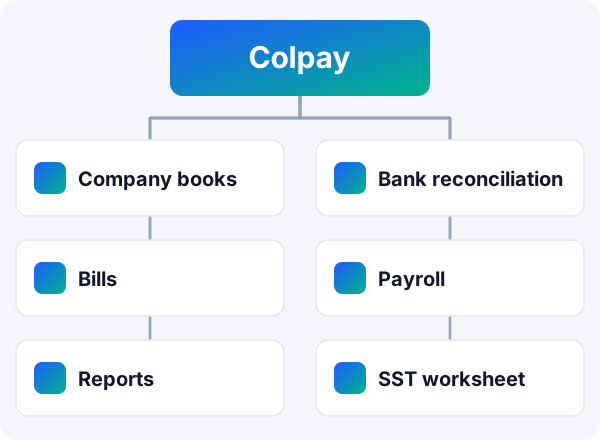
Colpay is accounting software for Malaysian small businesses that also need to track customer payments. Each company keeps its own double-entry books, with bank statement reconciliation, supplier bills and expenses, payroll with EPF, SOCSO, EIS and PCB, and profit and loss, balance sheet and cash flow reports.
The books sit next to your sales, instalment schedules, invoices and customer statements, so the money you receive and the money you spend are recorded in one place. Colpay helps you prepare records for review by you, your accountant or your tax agent. It does not file tax returns or statutory submissions for you.
Facts checked .
 What each company's books cover
Books are switched on separately for each company in your Colpay workspace, with their own chart of accounts.
What accounting does Colpay include?
Colpay includes per-company double-entry books, bank reconciliation, bills and expenses, a receipts inbox, payroll, financial reports, an SST worksheet and a tax-agent export pack. The table shows each area and its main limit.
Double-entry bookkeeping records every transaction in at least two accounts, so the total debits always equal the total credits.
| Area | What Colpay does | Limit to know |
|---|---|---|
| Books | Chart of accounts, balanced journal, trial balance and general ledger for each company | Switching books on does not rebuild all earlier history |
| Bank | Upload statements, match lines to book entries, finish a reconciliation | Works from uploaded statements, not a live bank feed |
| Bills and expenses | Supplier bills, expenses, partial payments and payables ageing | Recurring bills create drafts for you to review |
| Receipts inbox | Reads receipt photos and PDFs into proposed bills or expenses | A person normally reviews and approves each one |
| Payroll | EPF, SOCSO, EIS and PCB calculations, approval, locking and payslips | Check against current official rates; PCB method has documented limits |
| Reports | Profit and loss, balance sheet, cash flow and a management pack | No claim of compliance with any reporting standard |
| SST | Return-preparation worksheet with items that still need review | Does not file the return or set the final tax payable |
| Tax agent | Export pack of annual books, statements and supporting listings | Supplies records; it is not a tax return submission |
How do the company books work?
You switch on books separately for each company, and each company gets its own chart of accounts, journal, trial balance and general ledger. Customer receipts, supplier bills and payments, payroll and opening balances can post into those books.
Chart of accounts and journals
- Create, rename or deactivate accounts, with safeguards for the accounts the system needs.
- Manual journals must balance before they save.
- Voiding a journal posts a reversal and keeps the original entry.
Opening balances and year end
- Enter opening balances per company, with a balancing treatment.
- Each company can have its own financial year start.
- Closing a financial year creates the closing entries and protects the closed period; reopening reverses them.
Several companies
- One Colpay workspace can hold several company profiles, each with its own books.
- Inter-company transactions and balances are recorded.
- Transfers between a company's own accounts, petty cash and cash counts are supported.
Customer income goes into the books when money is received. An ordinary order or invoice does not create a receivable in the ledger; customer payment schedules and balances are tracked separately from the books. See invoice software for Malaysia and customer statements of account for that side.
Can I reconcile my bank statements in Colpay?
Yes. You upload bank statements as spreadsheet, CSV or PDF files, and Colpay compares the bank lines with the book entries for the selected company and bank account.
Bank reconciliation means checking that every line on the bank statement matches an entry in your books, and explaining any difference.
Upload and match
- Colpay keeps the original upload and flags duplicate lines and lines it could not read.
- It suggests matches with customer payments; an authorised person approves them before they become verified payments.
- Proposed, manual and grouped matches, with your own matching rules.
Fill the gaps and finish
- Record missing items such as bank charges, interest, supplier payments, customer receipts, own-account transfers or director transactions. Suggestions need your review.
- Unmatched bank lines and outstanding book entries stay visible and can be carried forward.
- A reconciliation finishes only when every line is resolved and the difference is zero. Reopening and adjustments keep their history.
Bank balances in Colpay come from your recorded books and the statements you upload, not from a live bank feed.
How do I record bills, expenses and receipts?
Record supplier bills and immediate expenses with a category, tax, dates and payment status, then pay bills in full or in parts. The receipts inbox reads photos and PDFs of receipts and proposes a bill or expense for you to check.
Suppliers, bills and expenses
- Supplier records hold business, tax, address and contact details.
- Bills and expenses can be split across companies; partial supplier payments are supported.
- Payables ageing shows what you owe and for how long.
- Recurring bill schedules create drafts for review instead of posting automatically.
Receipts inbox
- Upload receipt photos or PDFs, or collect them from a connected messaging, mailbox or shared-folder channel once set up.
- Colpay suggests the supplier, company, category, dates, total and SST shown on the receipt.
- Duplicate checks, re-reading and manual correction before anything posts.
- Human approval is the normal path; you can choose to let clear, non-duplicate receipts record automatically.
SST paid on supplier bills is kept as supporting information within the cost of the bill. Colpay does not treat it as an input-tax credit.
Does Colpay run payroll with EPF, SOCSO, EIS and PCB?
Yes. Colpay runs payroll by company and calculates EPF, SOCSO, EIS and PCB, with differences for supported employee categories and ages. Payroll runs are approved and locked, and payslips are produced as PDFs and can be emailed.
PCB (monthly tax deduction) is income tax that an employer deducts from an employee's salary each month and pays to LHDN.
What a payroll run covers
- Employees by company, with salary, allowances, employment details and contribution numbers.
- Draft adjustments, then approval and locking; unapproving or voiding is restricted.
- Payslip PDFs, bundled downloads and email distribution.
- Salary and statutory payments recorded, with matching book entries when books are on.
- Payroll information is limited to authorised roles.
Limits to check
- Statutory rates change. Check the amounts against the current official rates from KWSP (EPF), PERKESO (SOCSO and EIS) and LHDN (PCB).
- The built-in PCB method has documented limits for additional reliefs, benefits and income from a previous employer. You can enter a fixed PCB amount calculated elsewhere.
- Recording salary and statutory payments in Colpay is a record only. This page does not claim that Colpay files statutory submissions or transfers salaries for you.
You are responsible for your own payroll and tax obligations. Check them with the official agencies or a qualified adviser.
Which financial reports can I get?
Colpay produces profit and loss, balance sheet and cash flow reports with comparison periods, plus a management pack. Reports export to spreadsheet and PDF, and flag an imbalance or a cash difference if one exists.
Financial statements
Profit and loss, balance sheet and cash flow, each with comparison periods and company-specific financial year settings.
Management pack
Results, year-to-date comparisons, cash, expenses, customer balances and supplier ageing together in one pack.
Operational reports
Sales, collections and refunds, receivables, scheduled collections and product sales, with filters and spreadsheet export.
Combining several companies uses a limited aggregation that removes matched inter-company balances. It is not full group consolidation. Report labels do not mean the statements meet a particular accounting standard; that needs a qualified review.
Can Colpay help with SST and my tax agent?
Colpay helps you prepare, not file. An SST worksheet gathers the tax recorded on your documents for review, and a tax-agent export pack bundles your annual books and supporting listings for your tax agent.
SST is Malaysia's Sales and Service Tax, administered by the Royal Malaysian Customs Department.
SST return-preparation worksheet
- Uses the tax and document information you recorded.
- Lists unmapped or provisional items that still need a decision.
- Exports supporting detail for review.
- Leaves out items it cannot treat reliably, such as non-ringgit documents without a reliable conversion and unlinked receipts.
Tax-agent export pack
- Combines supported annual books, financial statements and supporting listings.
- Gives your tax agent the records in one download.
- It supplies records only; it is not a tax return submission.
The worksheet does not file an SST return or confirm the final tax payable. Check your own obligations on the official MySST portal and with your tax adviser. For e-invoices, see e-invoice software for Malaysia (LHDN MyInvois).
What about directors' accounts, fixed assets and dividends?
Colpay records directors' accounts with statements, equipment with depreciation, and dividend declarations and payments, each inside the company's books.
Directors' accounts
Money a director lent, repaid, introduced or is owed, with a statement for each director.
Fixed assets
Equipment records with cost, depreciation schedules and runs, disposals and reversals.
Dividends
Dividend declaration and payment records, with accounting restrictions. Colpay does not decide whether a company has profits available to distribute.
Who is Colpay accounting for?
Colpay suits Malaysian small businesses that sell on instalments or repeat payments, such as memberships, courses, subscriptions and physical goods, and want their books next to their payment tracking.
A good fit when you
- Track customer instalments, reminders and statements and also want company books.
- Run more than one company and want separate books for each.
- Work with a bookkeeper, accountant or tax agent who reviews your records.
- Use a phone or computer; Colpay works in the browser.
Look elsewhere if you need
- A live bank feed into your books.
- Full group consolidation with ownership, acquisition or currency translation.
- Warehouse, batch or serial-number stock and purchase orders.
- Software that files tax returns or statutory submissions for you.
Accounting software in Malaysia compared · Instalment payment tracking in Colpay
Plans and trial
Current Colpay plans, prices, billing interval and trial length are shown on the pricing page, at sign-up and on the billing screen inside the app.
Trial
Try the books, bank reconciliation and reports with your own company data.
See plans and pricing