

Home › E-invoice software for Malaysia
LHDN MyInvois e-invoicing for Malaysian businessesE-invoice software for Malaysia (LHDN MyInvois)
Colpay is e-invoice software for Malaysian businesses that want to prepare LHDN MyInvois e-invoices from the payments and sales invoices they already record. You create an e-invoice draft from a customer payment or a sales invoice, review it, approve it and submit it to LHDN, then follow its status until it is validated, rejected or cancelled.
Colpay covers 8 MyInvois document types (regular and self-billed invoices, plus credit, debit and refund notes for each), prepares monthly consolidation drafts, and keeps test and live submissions apart. It does not claim LHDN certification, and a draft is not a validated e-invoice until LHDN validates it.
Facts checked .
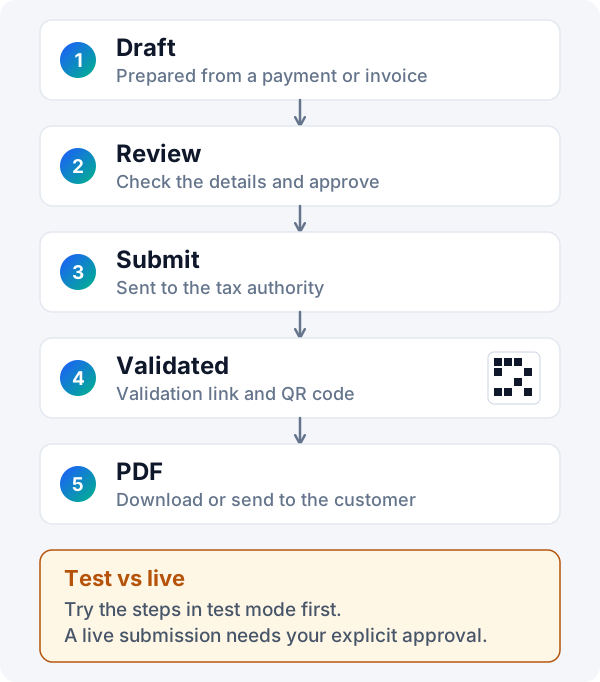
 The e-invoice workflow at a glance
Each company in your Colpay workspace has its own MyInvois details, so e-invoices go out under the right supplier identity.
What is MyInvois, and what does e-invoice software do?
MyInvois is the system that receives and validates e-invoices for LHDN. E-invoice software prepares each e-invoice in the required digital format, sends it to MyInvois and shows you whether it was validated.
LHDN offers two routes: the MyInvois Portal, where you enter documents yourself, and connected software such as Colpay, which builds the e-invoice from records you already keep. Which businesses must issue e-invoices, and from when, is set by LHDN. Check the official guidance on the LHDN website and the MyInvois Portal for your own obligations.
What does a Malaysian e-invoice contain?
LHDN describes an e-invoice as a digital representation of a transaction between a supplier and a buyer, holding the same core information as a traditional invoice.
The details LHDN lists
- Supplier and buyer details
- Item description
- Quantity
- Price before tax
- Tax amount
- Total amount
The exact data fields and document types are set out in LHDN's guidelines. Read them on the LHDN guidelines page, or start with our LHDN e-invoice guide.
Source: LHDN, e-Invoice, read on 29 October 2026. This is the list LHDN gives on that page, not the full set of required fields.
How much does e-invoice software cost in Malaysia?
Colpay's current plans, prices and trial length are shown at sign-up and on the billing screen inside the app; prices for other accounting software are compared, with dates, on the accounting software comparison page. See also the pricing page.
How do you set up MyInvois in Colpay?
You enter MyInvois details for each company in your Colpay workspace, then add tax details to the customers you will e-invoice. Each company is set up on its own, so a business with several companies keeps them apart.
Company (supplier) details
- Supplier identity, TIN, registration or identity details and business classification.
- Addresses, tax defaults and connection settings for MyInvois.
- Upload or remove a signing certificate, see its details and expiry, and test the connection.
Customer (buyer) tax records
- Business or individual customer type, TIN, registration or identity number.
- SST information, contact details and address.
- TIN search and validation before you build the e-invoice.
Company and customer tax details are facts you enter for your own business. Check that they match your registration records before you submit.
How does Colpay create an e-invoice?
Colpay creates an e-invoice draft from a customer payment or a sales invoice you have already recorded. You review the draft before anything is submitted to LHDN.
An e-invoice draft is a prepared document inside Colpay that has not yet been submitted to or validated by LHDN.
Start from a record
Pick a customer payment or a sales invoice. Colpay fills the draft from the company, customer and amounts in that record.
Review and approve
Check the draft. For live submission, you approve each document explicitly before it goes to LHDN.
Submit and follow up
Submit the e-invoice, then let Colpay refresh its status and show any validation errors to correct.
Need ordinary quotations, invoices and delivery orders first? See invoice software for Malaysian businesses.
Which e-invoice types can Colpay prepare?
Colpay prepares regular e-invoices and self-billed e-invoices, each with linked credit, debit and refund notes: 8 document types in all. Notes are checked against the original document and its status.
A self-billed e-invoice is an e-invoice that the buyer issues on behalf of the supplier, in situations LHDN allows.
| Document | Regular | Self-billed |
|---|---|---|
| Invoice | Yes | Yes |
| Credit note | Yes, linked to the original | Yes, linked to the original |
| Debit note | Yes, linked to the original | Yes, linked to the original |
| Refund note | Yes, linked to the original | Yes, linked to the original |
Supporting a self-billed document type does not mean every self-billing situation is allowed. Check LHDN's guidance for when self-billing applies to you.
Can Colpay prepare consolidated e-invoices?
Yes, as drafts. Colpay can prepare a monthly consolidation draft for a company from eligible verified, unrefunded receipts, leaving out receipts already covered by an active e-invoice. It does not submit the consolidation draft on its own.
A consolidated e-invoice combines several transactions into one e-invoice for a period, where LHDN allows it.
What Colpay does on schedule
- Prepares monthly consolidation drafts.
- Refreshes the status of e-invoices already submitted.
What stays with you
- Reviewing each consolidation draft.
- Deciding whether and when to submit it, including in the test setup.
What controls are there before a live submission?
Test and live (production) submissions are separate in Colpay. A live submission needs the company's live switch turned on, a signing certificate, and your explicit approval of each document.
| Control | What it means for you |
|---|---|
| Separate test and live submission | Try your setup with test submissions before anything reaches LHDN's live system. |
| Company live switch | Live submission stays off for a company until you turn it on. |
| Signing certificate | Upload or remove the certificate; Colpay shows its details and expiry, and lets you test the connection. |
| Explicit approval | Each live document waits for your approval before it is submitted. |
| Signed and unsigned formats | Both document formats are supported for submission. |
What happens after you submit an e-invoice?
Colpay refreshes the submission status, shows validation errors so you can correct and rebuild the document, and handles cancellation and rejection. Validated e-invoices show a validation link, a QR code and a PDF.
Status, errors and corrections
- Status refresh after submission, with filters by company and status.
- Validation errors shown so you can correct the details and rebuild the document.
- Cancellation and rejection workflows, with status, time and reason checks.
- Activity notices when e-invoice status changes.
After validation
A validated e-invoice carries LHDN's validation link and QR code, and Colpay produces a PDF you can share with the customer.
If a submission fails in transit or its outcome is unclear, its status must be checked and settled before it is retried, so the same document is not sent twice.
Can I submit with my own MyInvois credentials or through an intermediary?
Both. A company can submit with its own MyInvois credentials, or through a configured intermediary company, as long as the required credentials, signing certificate and authorisation on the MyInvois side are in place.
An intermediary is another company that submits e-invoices on a taxpayer's behalf, with that taxpayer's authorisation.
What are the limits of Colpay's e-invoicing?
Colpay gives you the tools to prepare, approve, submit and track MyInvois e-invoices. Whether a document is valid is decided by LHDN, and your e-invoicing obligations are yours to check.
What this page does not claim
- Colpay is not described here as certified, listed or approved by LHDN.
- No live Colpay submission evidence is shown on this page.
- Colpay does not guarantee that every document will be accepted.
- Colpay does not cover every regulated e-invoice situation.
What to check yourself
- A draft or a submission request is not a validated e-invoice until LHDN validates it.
- Whether and from when your business must issue e-invoices: see LHDN.
- When consolidated or self-billed e-invoices apply to you.
- That your company and customer tax details are correct.
Frequently asked questions
Answers to questions people search for about e-invoicing in Malaysia.
What is e invoice Malaysia?
An e-invoice in Malaysia is an invoice in a digital format that is submitted to the Inland Revenue Board of Malaysia (LHDN) and validated through its MyInvois system, and a validated e-invoice receives a validation link and QR code. The LHDN e-invoice guide explains it in plain language; LHDN sets who must issue e-invoices and from when.
How to submit e invoice LHDN?
In Colpay, you enter your company's MyInvois details, create an e-invoice draft from a customer payment or a sales invoice, review it and submit it; live submission needs a signing certificate and your explicit approval of each document. The LHDN e-invoice guide also covers the MyInvois Portal route.